


SilkstackAI developer toolsProductsWeaver

Run Claude Code, Codex, Cursor and Pi from one app.

Weaver runs the coding agents you already use, on your own machine. It keeps their sessions in one list, carries a conversation from one agent to another, and lets you pick up any session from your Android phone, iPhone or iPad.

Weaver is free for individuals. It is available for Macs with Apple silicon, Windows, Linux, Android, iPhone and iPad.

Responsive web UI · desktop and phone layouts · mock conversations

Read the conversation above the composer, with model, thinking and Plan controls below the draft.

Current Weaver web UI with a release-notes mock conversation and the actual composer controls.
Agents

Supported agents

Weaver has no account of its own. It uses each agent’s sign-in.

Claude Code

Signs in with your Claude subscription or an Anthropic API key.

Codex

Signs in with ChatGPT or an OpenAI API key. It needs the Codex CLI, which Weaver offers to install.

Cursor

Signs in with a Cursor API key.

Pi

Signs in through Pi, with any model provider Pi supports.

Copilot and OpenCode are built but not switched on yet. The Agents page explains how to sign in to each agent.

What it does

What Weaver does

Chat controls

Keep the conversation in view.

The draft sits below the conversation. Model, thinking and Plan controls stay together beneath it, with Send at the trailing edge.

  • Choose settings from the composer
  • Read the conversation without opening another panel
Current Weaver web UI with a release-notes mock conversation and the actual composer controls.
Read the conversation above the composer, with model, thinking and Plan controls below the draft.
Session links

Keep related conversations close.

A link to another session opens a menu in place. Open that conversation, add it in a new pane, or pin it for later.

  • Open a session link without losing your place
  • Pin a related conversation from its menu
A related-session link in a mock conversation with its real hover menu open.
Link a related session and open its menu for actions without losing your place.
Pinned sessions and panes

Arrange the work you want to follow.

Pin sessions to keep them easy to find. On a wide screen, drag pane headers to rearrange conversations side by side. On a phone, find the pinned conversation in the sessions drawer.

  • Pinned sessions lead the list
  • Wide layouts keep several conversations visible
Pinned mock session and rearranged conversation panes; phone screens show the pinned-session drawer.
Pin a session and drag pane headers to arrange your work side by side. On phones, the sessions drawer shows the pinned conversation.
Also in Weaver

Continue with another agent

Continue with a full conversation under 512 KiB or a compact brief. Weaver opens a new session; the original stays unchanged.

Delegate work

Claude Code, Codex and Cursor can start ordinary sessions, send work and read their results.

Your machine

Agents and sign-ins stay on your computer. Paired devices connect over an encrypted channel; the relay cannot read prompts or code.

Worktrees

Turn on worktrees, and each new session in a git repository gets its own worktree and branch.

One session, several devices

Every paired device can follow and prompt the same live session at once. An unsent draft carries over from one device to the next.

Past chats

Weaver loads the chats you already had with Claude Code, Codex and Pi, so you can pick any of them up.

Steer or queue

Send a message while an agent works. Queue it as the next prompt or, with Claude Code, Codex or Pi, steer the current turn.

Models and effort

Choose the model and effort for each session. Turn on fast mode for Claude Code, Codex and Cursor models that offer it.

Files and commands

Type @ to mention a file or folder, or / for Weaver’s commands and the agent’s own.

Search

Search every session by title, first prompt, project or label.

Usage

A usage report shows tokens and turns by agent, model and project, with an estimated cost where the agent gives one.

Why Weaver

Punched cards and the silk loom

In 1804, Joseph Marie Jacquard patented a loom that wove patterns from a chain of punched cards. Each card told the loom which threads to lift.

Charles Babbage planned to program his Analytical Engine with the same kind of cards. In 1843, Ada Lovelace wrote that the engine “weaves algebraical patterns just as the Jacquard-loom weaves flowers and leaves.”

We named our app Weaver because you are the person at the silk loom. You weave together threads of software across different agents into a beautiful tapestry.

Silkstack builds AI developer tools, and Weaver is its first product. We hope that Weaver changes the way software is made, the way Jacquard’s loom changed how textiles were made.
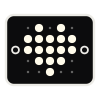
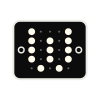
1804Jacquard’s loom1843Lovelace’s notesTodayWeaver
Editions

Community and Enterprise

Free · Available now

Community

Weaver is free for individuals and includes everything above.

  • On your machine. Agents work on your Mac, Windows or Linux machine, and their sign-ins and logs are stored there.
  • An encrypted relay. It cannot read your prompts or code.
  • Your agent accounts. Use your agent subscriptions and API keys.
  • Agents that work together. Claude Code can ask Codex for a review.
  • Optional analytics. Turn them off at any time. Crash reports stay on.
  • All your machines. Weaver works on Mac, Windows, Linux, iPhone and iPad, and shows every paired machine’s sessions in one list.
For companies · Design partners

Enterprise

Your developers likely use several coding agents, with separate sign-ins, settings and bills. We are building one place where your whole team works with all of them.

  • Multiplayer sessions. Your team signs in with SSO, and several people can follow and prompt the same live agents.
  • Roles and approvals. A PM can propose a change, but only an engineer can approve it. An audit log ties every action to a person.
  • One budget across agents. Each team gets a budget, and leadership sees the estimated cost of each merged change.
  • Your own cloud. Team servers run agents in your own cloud, with logs under your encryption keys.
  • Plugins. Connect your own tools to Weaver, and choose which plugins your people can run.
  • An independent vendor. We make no agent or model, so you could switch agents and keep the same controls.

None of this ships today. Design partners pilot early versions with us and help decide what we build first.

Become a design partner[email protected]
Download

Get Weaver

These are Alpha builds. Weaver updates them often, and they may have bugs.

Mac

The app is for Macs with Apple silicon. It is signed and notarized.

Windows

The app is for Windows 10 and 11 on x64. It isn’t code-signed yet, so SmartScreen warns you before it installs. Choose More info, then Run anyway.

Linux

We publish DEB and RPM packages for x64 and ARM64, and a Pacman package for x64.

Download for Linux

Android

Download the signed Weaver-alpha APK. Allow your browser to install this app when Android asks. Open Weaver and scan the pairing QR code in Settings on your Mac, Windows or Linux machine. This Alpha is installed directly; it is not a Google Play release.

iPhone and iPad

The app is available through TestFlight. It connects to Weaver on your Mac, Windows or Linux machine.

Weaver is not available for Intel Macs or Windows on ARM.